Keyboard Shortcuts
To achieve maximum velocity while documenting your architecture, Rekhic heavily relies on keyboard shortcuts.
[!TIP] You can view these shortcuts at any time inside the app by pressing
?to open the Shortcuts Modal.
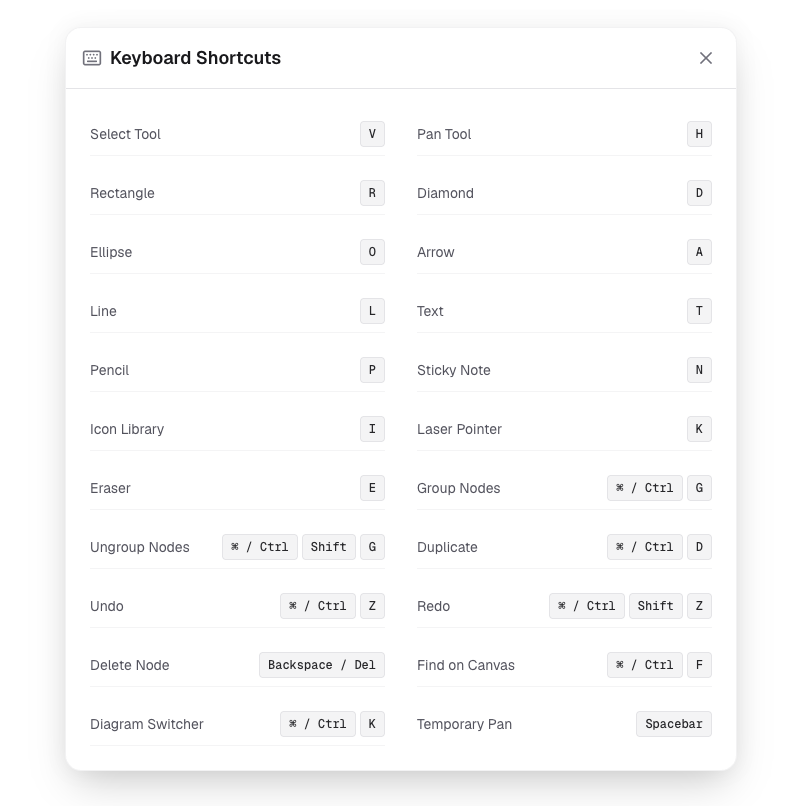
Navigation & Viewport
Space + Drag: Pan the canvas.Cmd/Ctrl + Scroll: Zoom in/out.Shift + 1: Fit view to contents.
Creation
R: Create RectangleT: Create Text NodeA: Create Architecture NodeS: Create Sticky Note
Selection & Editing
Click: Select single node.Shift + Click: Add to multi-selection.Shift + Drag: Marquee drag selection.Cmd/Ctrl + A: Select all nodes.Cmd/Ctrl + C: Copy selection.Cmd/Ctrl + V: Paste selection.Cmd/Ctrl + G: Group selected nodes.
Deletion
BackspaceorDelete: Delete selected nodes or edges.